> ## Documentation Index
> Fetch the complete documentation index at: https://docs.kiwify.com.br/llms.txt
> Use this file to discover all available pages before exploring further.
# Overview
> Detailed documentation about section settings configuration.
## Properties
The type of setting input. Available types:
* [checkbox](/en/members-area/reference/schema/fields/settings/input-types/checkbox) - Boolean toggle
* [course](/en/members-area/reference/schema/fields/settings/input-types/course) - Course selector
* [image\_picker](/en/members-area/reference/schema/fields/settings/input-types/image-picker) - Image selection
* [course](/en/members-area/reference/schema/fields/settings/input-types/module) - Module selector
* [range](/en/members-area/reference/schema/fields/settings/input-types/range) - Numeric slider
* [select](/en/members-area/reference/schema/fields/settings/input-types/select) - Toggle button selection
* [text](/en/members-area/reference/schema/fields/settings/input-types/text) - Single line text input
Unique identifier for the setting. Must be unique within the section.
The label shown in the theme editor for this setting. It may be translated using `t:` prefix plus a valid key from schema translation files. More details can be found in [Locales](/en/members-area/key-concepts/theme/locales).
Default value for the setting. Type depends on the setting type.
Additional information shown below the setting in the theme editor. It may be translated using `t:` prefix plus a valid key from schema translation files. More details can be found in [Locales](/en/members-area/key-concepts/theme/locales).
For select settings, an array of options with value, label and icon properties.
For range settings, the minimum allowed value.
For range settings, the maximum allowed value.
For range settings, the step increment.
For range settings, the unit to display (e.g., "px", "sec").
Additional properties for the setting. Currently supported:
* `hidden`: boolean value, indicates whether this setting should be displayed in Theme Editor's configuration bar
* `validations`: Apply validations to this setting before saving. Currently supported:
* `required`: Boolean value. If true, this setting must be filled with a valid value
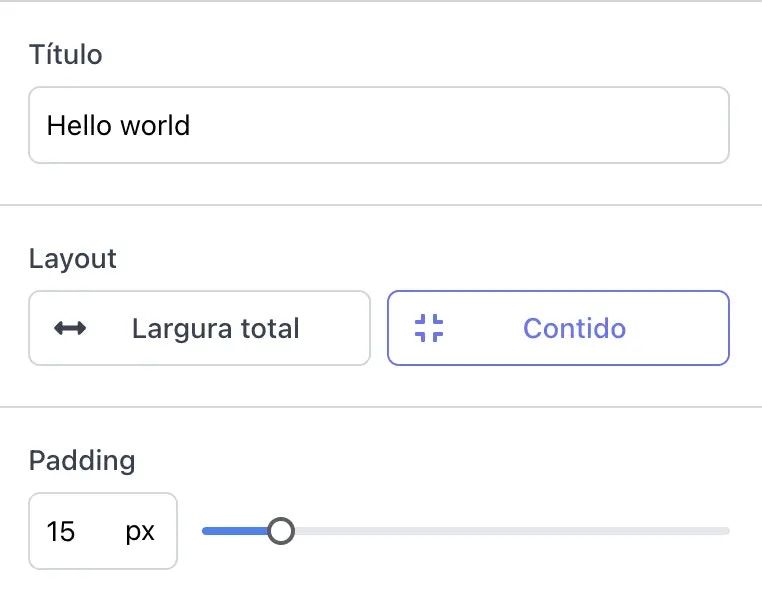
```json theme={null}
{
"settings": [
{
"type": "text",
"id": "heading",
"label": "Heading",
"default": "Hello, world!"
},
{
"type": "select",
"id": "layout",
"label": "Layout",
"options": [
{
"value": "full_width",
"label": "Full width",
"kiwi_extra": {
"icon": "fa fa-arrows-alt-h"
}
},
{
"value": "contained",
"label": "Contained",
"kiwi_extra": {
"icon": "fa fa-compress"
}
}
],
"default": "full_width",
"kiwi_extra": {
"labeled": true
}
},
{
"type": "range",
"id": "padding",
"min": 0,
"max": 100,
"step": 5,
"unit": "px",
"label": "Padding",
"default": 20
}
]
}
```